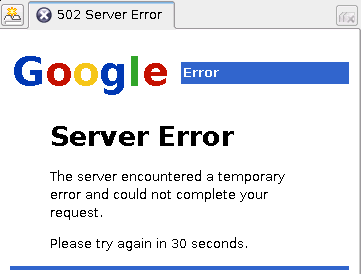
 Went to check my blog tonight and found this instead. Ah, well, could have been worse, much worse... however, after a few minutes worth of 'trying again in 30 seconds' it became clear that something was serious foobared here.
2006-08-28
Blogger is busted
2006-08-26
Beyond CVS for Linux
Solved a long-standing annoyance this week - using the BeyondCVS Eclipse plugin on Linux.
One day, if I have time I'll try to turn this into a fragment so that it'll work without outside effort, but for now, here's the HOWTO:
0. Install WINE using yum, apt-get, etc. as appropriate for your linux distro. (Chances are this is already installed.)
1. Install beyond compare, from Scooter Software. I installed it using wine into /opt/beyondcompare2:
$ wine beycomp.exe
2. Create a script (eg., ~/bc2.sh) to handle passing commandline args. Your script might require a different drive letter prefix, depending on your wine install - I've had to use both s: and z:. chmod your script so it's executable (chmod +x ~/bc2.sh).
#!/bin/sh

# collect commandline params and turn them into wine-friendly paths
opts="";
while [ "$#" -gt 0 ]; do
  opts=$opts" s:"$1; shift 1;
done

/usr/bin/wine /opt/beyondcompare2/BC2.exe $opts
3. Test your script by running it in a console window.
$ ~/bc2.sh
4. Install BeyondCVS plugin and feature into your Eclipse 3.2+ install (or using a .link file).
5. Start Eclipse. Open up Help > Window > Preferences... > External Tools Launcher > Beyond Compare. In the field Path To Beyond Compare, enter the path to your shell script, eg., /home/nickb/bc2.sh. Leave the Show Debugging Info? checkbox enabled.
6. Select two files or folders in your Package Explorer or Navigator. Beyond Compare should launch under WINE. If it doesn't, open a console and run your bc2.sh script, passing the same two parameters shown in the debug info popup in Eclipse. As noted above, you might have to change the drive letter from s: to z: or something else so that WINE can find the files you passed it. If all worked, you can remove the Show Debugging Info? checkbox in the Preferences panel.
Happy comparing!
2006-08-16
The cow says...
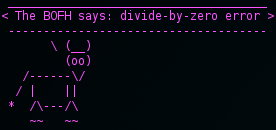
Logging in today, I actually got the BOFH cow to randomly mention division by zero!
To enable this in your ~/.bashrc or /etc/bashrc, install cowsay and fortune, then add this to the end of your script. Note that on some systems you get different fortune options than the ones I've got below.
if [ "$TERM" != "dumb" ]; then
  # define some colour codes to use
  # eg., 36: cyan, 35: purple, 34: blue, 33: yellow, 32: green, 31: red
  # can also use darker version with 0;36, 0;36, etc.
  col="\033[1;35m";
  norm="\033[0;39m";

  echo -e -n $col; # change colour

  # get a fortune and pipe it to cowsay, using the apt cow
  fortune -a 20% riddles 30% literature 10% fortunes 40% excuses     | cowsay -n -f apt.cow;
  echo -e $norm; # return to normal
fi
If you want to create your own fortunes, have a look in /usr/share/games/fortunes, then create a text file with each line being a unique message. In the example below, I called this file BOFH_excuses.txt, sourced here. Process the file with gawk to change this:
High line impedance.
Someone set us up the bomb.
Power surges on the Underground.
into this:
The BOFH says: High line impedance.
%
The BOFH says: Someone set us up the bomb.
%
The BOFH says: Power surges on the Underground.
%
$ gawk -F: '{ print "The BOFH says: "$1"\n%" }' BOFH_excuses.txt > excuses;
Now, each entry in excuses ends with a newline and a "%". Multi-line entries are also separated by "%" - see other files in the /usr/share/games/fortunes folder for examples.
To index your new file so that fortune can use it, you must run it through strfile:
$ strfile excuses excuses.dat
Finally, to test your new fortunes, run this:
$ fortune excuses
How'd you get your Notes email address?
From the 'answered too many times to count' department:
So, why codeslave in the first place?
I used to be nboldt... until I found a badly-documented feature in Lotus Notes (circa 6.0 or 6.5, I think) that lets you request a new shortname - that is, to change from nboldt@mydomain.com to codeslave@mydomain.com. I think the reason for its being there was so that when women got married they could change their shortname to match their new lastname, eg. jsmith -> jjones.
So I became codeslave. I've also seen fivetwelve, zx and mo.
If you're using Lotus Notes 7.0b3 (aka NUL, or Notes Under Linux, though I always picture Nibbles from the show ReBoot when I think of NUL), this feature is still available. Sorta.
  File > Security > User Security
      > Your Identity > Your Names > [Name Changes...]
To change your names, you should contact ________________ [Send Mail]
Oddly enough, the window says "You can request changes to your Notes user name, alternate name, and aliases," but if you click Send Mail, it only prompts for the new name, not the shortname... and while there's a handy li'l tool for sending a prefilled email...
  Please change my name to 'Nick Boldt'.  My ID containing the
  new name is attached in case it is needed.
... it doesn't provide the name of the admin to send it to in the To: field. ;-)
2006-07-30
Could someone explain spamvertising to me?
I just don't get spamvertising. The ones with virii, infectious attachments, or ads for viagra, sure. Hell, even the phishing scams to get me to enter my paypal or banking info make sense. Some are just plain comical. But lately I've been getting a lot like this:
Is the idea that if they can't convince me to call them based on a good customer testimonial, they'll hook me in with a little gay pr0n?Subject: Eradicate all that you are indebted for without sending an other dollar
"Man! You have got one satisfied customer here. You see I availed myself of your services to completely Abolish all of my $52,000.00 in credit card balances. I was given the opportunity to discontinue all payments at once without using insolvency, counseling, or bank counseling.
Now, I'M back in the driver's seat and ALL of my high-interest obligations, fines, and fees are gone Legally and rightfully For good.
You are reputed to be the number one nationwide I totaly agree I will be mentioning all my relatives and officemates to call you. They would be insane not to get in touch with you straight away.
I can not thank you enough,, you have made life much brighter for me". Johnn C. in Texas
Dial
xxx--yyy-zzzz (phone number removed in case it's a real one)Thorough knowledge or to bring to an end obtaining or to view our location
Rob stirred uneasily in his sleep, and one of the Turks drew a slight but stout rope from his breast and with gentle but deft movement passed it around the boy's wrists and drew them together behind him.The action was not swift enough to arouse the power of repulsion in the Garment of Protection, but it awakened Rob effectually, so that he sat up and stared hard at his captors
What are you trying to do, anyhow? he demandedm15
Welcome Back, Opie
 Well, after a few weeks with GPE, I decided it was time for better app support, so I've switched back to OPIE. Here's the log:
- Fix /etc/network/interfaces - set up wlan:
 # Wireless interfaces
 auto wlan0
 iface wlan0 inet dhcp
 address 192.168.0.100
 netmask 255.255.255.0
 gateway 192.168.0.1
 wireless_essid %YOURSSID%
 wireless_key s:%YOURSTRINGBASEDPASSWORD%
 wireless_mode managed
- Start up the wireless network
$ /etc/init.d/networking restartSSH - Install openssh-ssh (client), openssh-sshd (server), and openssh-sftp (for use with synching later)
Network
$ ipkg install openssh-ssh openssh-sshd openssh-sftp
 Host dbz
 Hostname divbyzero.homelinux.net
 Port 11122
 Host zaurus
 Hostname 192.168.0.100
 Port 10122
$ /etc/init.d/sshd restart $ /etc/init.d/dropbear stop; mv /usr/sbin/dropbear /usr/sbin/DISABLED_dropbear; vi /etc/init.d/dropbear $ ssh -p %anotherPort% %zaurusUser%@%zaurusIPaddress% $ ssh -p 10122 nickb@192.168.0.100
$ ssh-keygen -t rsa -b 2048Terminal tools
/etc/ipkg/perl-feed.conf, containing:
 src/gz x11 http://divbyzero.homelinux.net:8080/mirrors/www.openzaurus.org/
official/unstable/3.5.4.1/feed/perl
$ ipkg install bash less perl rsync $ adduser nickb; cd /var; chmod o+w,g+w tmp;
/etc/passwd to make root and your other user(s) use bash instead of sh.
 root:encryptedpasswordhere:0:0:root:/home/root:/bin/bash
 nickb:encryptedpasswordhere:1000:1000:nickb:/home/nickb:/bin/bash
/etc/bashrc and /etc/alias files, then point to them with .bashrc and
.bash_profile files in home folder:
 #  ~/.bash_profile
 . ~/.bashrc
 #  ~/.bashrc
 [ -f /etc/bashrc ] && . /etc/bashrc
 #  /etc/bashrc
 source /etc/alias
 # 1;34: blue, 1;33: yellow, 1;32: green, 1;31: red, 1;30: grey, etc.
 if [ $UID -eq 0 ]; then # root
   prompt="\[\033[1;31m\]\u@\h\[\033[0;39m\]:\[\033[1;31m\]\w\\[\033[0;39m\] \$ ";
 else
   prompt="\[\033[1;30m\]\u@\h\[\033[0;39m\]:\[\033[1;34m\]\w\\[\033[0;39m\] \$ ";
 fi
 # If this is an xterm set the title to user@host:dir
 case $TERM in
   xterm*)
     export PS1="\! "$prompt"\[\e]30;\u@\H:\w\a\]"
     export PROMPT_COMMAND='echo -ne "\033]0;${USER}@${HOSTNAME}: ${PWD}\007"'
     ;;
   *)
     export PS1=$prompt
     ;;
 esac
 #  /etc/alias
 alias   ll="ls -lA"
 alias   rm='rm -i'
 alias   cp='cp -i'
 alias   mv='mv -i'
 alias   al='vi /etc/alias'
 alias   sra='source /etc/alias'
 alias   H='history 50'
$ alsamixer
Mail
$ ipkg install mutt mailx sendmail ssmtp fetchmail/etc/ssmtp/ssmtp.conf to enable smtp to send mail using you
existing smtp setup from another machine:
 root=<me@myemail.com>
 mailhub=smtp.1and1.com
 # Where will the mail seem to come from?
 rewriteDomain=smtp.myemail.com
 # The full hostname
 hostname=me@myemail.com
 # auth user must be your remote email username
 AuthUser=me@myemail.com
 # AuthPass must be your remote email password
 AuthPass=mypassword
$ ipkg install task-opie-games task-opie-extra-games atomic $ /opt/QtPalmtop/bin/icon-reload.sh
 #!/bin/sh
 # Save as ~/BIN/zaurus-sync.sh
 cd /home/nickb/zaurus/_RSYNC_Zaurus_SLC3200_OPIE
 for f in usr etc home; do
  rsync -qrpogtz root@zaurus:/$f .;
 done
crontab -e. You might want something like this,
to run a backup once a week at 4am:
 # m h  dom mon dow   command
 0 4 * * 6 /home/nickb/BIN/zaurus-sync.sh
/etc/ssh/ssh_config on the desktop.
2006-07-10
The Land of OZ, Days 2 - 3
Day 2 (GPE)
Problems, con't:
- Due to suggestion in OZ wiki, set / partition to 150M; filled almost immediatly w/ files in /usr/lib (while installing gxine or something). Since busybox's find doesn't support the -maxdepth or -exec flags, got sizes of subdirs of a given folder with:
$ alias dirsize='alias ls=ls;for f in `ls`; do du $f -sh; done' - Gxine dies in fullscreen mode; no sound. Found a note about alsamixer, but haven't tested that out on GPE yet.
- Sylpheed doesn't start (probably due to lack of disk space, as per above)
- No backup/restore - but I should be able to run rsync
Day 2 (OPIE)
Decided to try OPIE for comparison. Wasn't any better - in fact, I found it worse.
- Gaim won't work; Gaim-Sametime won't install (missing dependency)
- XMMS - no sound / won't play; Opie Media Player - won't play MP3
- Eligo, ZSolitaire won't work
- No way to resize/rotate games when really small
- No way to change ugly default opie background
- Update: Use Settings > Launcher > Tabs > (pick a tab) > Edit > Image > Select...
- No way to set alphanumeric PIN for password protection (numeric only)
- No card management applet in task tray
- No volume applet in task tray
- Appearance crashed
- After reboot, sound works in XMMS and OpiePlayer, but no volume control, except by running
alsamixerin a terminal.
Day 3 (GPE)
Gave up on OPIE after a day; tried CackoROM (SL-C3200-Qtopia-1.23-2125070506) but it wouldn't boot; after two tries I decided to go back to GPE. Could have been a problem with SD card being ext2; could have been a problem w/ paritions on hda (ext2 vs. ext3, ext2 vs vfat). Not sure.
#!/bin/sh
cd /home/nickb/zaurus/BACKUP;
for f in etc home usr; do
  rsync -rv zaurus:/$f .;
done
xmonobut applet!
- tap once to activate middle button (paste)
- tap again to activate right button (select?)
- tap third to revert to left button
So to copy/paste text in terminal:
- select text to copy,
- tap xmonobut applet icon once,
- tap in terminal to paste at cursor location, then
- tap twice to reset to left button.
2006-07-08
Get your red-hot bits here!
I've offered up some bandwidth to the OpenZaurus folks so that those of you in North America can get your bits from this side of the pond. Details here: http://openzaurus.org/wordpress/2006/07/06/openzaurus-3541-release/
2006-07-07
OpenZaurus 3.5.4.1 released!
 The latest OZ was released this week, after much anticipation. It's the first OZ to support my new C3200, and I'm happy to report that after a few hours I had nearly everything working!
Below are a few of the gotchas I encountered:
- Can't save wireless config settings with Network Setup: get error "No write access to network configuration"
solution: hack/etc/network/interfaces# Wireless interfaces auto wlan0 iface wlan0 inet dhcp # uncomment next three lines if want static IP, for example #address 192.168.0.100 #netmask 255.255.255.0 #gateway 192.168.0.1 wireless_essid <YOUR_SSID> wireless_key s:<YOUR_STRING_BASED_PASSWORD> wireless_mode managed - Can't save Owner Information - data not written to
/etc/gpe/gpe-ownerinfo.dataso login screen always defaults to "GPE User"
solution: create file with contents like this:
[gpe-ownerinfo data version 2]
/usr/share/gpe/pixmaps/gpe-logo.png
Nick Boldt
nick{at}divbyzero.com
http://divbyzero.com
...
solution: hack
~/.matchbox/mbdock.session opie-embeddedkonsole) dropbear) to deviceworkaround: change
/usr/bin/mb-applet-xtern-wrapper.sh to use bash instead of sh when launching terminal: exec /usr/bin/rxvt -e bash 2006-07-03
Dog Paddling Adventures - Massassauga Provincial Park
Had a great time this weekend with K, Patch & Buddy up at Massassauga Provincial Park - only saw one snake, and it wasn't the rattler for which the park gets its name. Thanks to everyone - two- and four-legged - who joined us and pitched in to share the work and the fun! Special thanks to Donna and of course Jessie (!) for making it a memorable experience as always.
Subscribe to:
Posts (Atom)


